BMW Multi Tool V1.2 from utradeshop
shenzhen added on 06-03-2012, Classified number: 15421
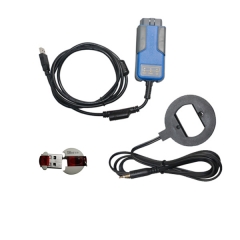
BMW Multi Tool V1.2
Powerful than AK300!!!
BMW Multi Tool includes forth parts, hardware device, dongle, programmer, software. Before running software you must connect dongle and hardware device to computer.
Description:
1. OBD II CONNECTOR: Connects the tool to the vehicle's Data Link connector (DLC).
2. Dongle: USB dongle.
3. USB CONNECTOR: Connects the tool to the PC/Laptop through USB Cable.
4. Programmer: Program keys.
5. Programmer Female Pin: Connects programmer to device.
6. Programmer Male Pin: Connects programmer to device.
Specifications:
1.Operating Temperature: -20 to 70 ( -4 to 158 )
2. Storage Temperature: -40 to 85 ( -40 to 185 )
3. Diagnostic Interface: 16 PIN
4. USB Interface: USB 2.0
5. Power: DC 5 V - 12 V
6. Consumption: 1 W
7. Dimensions: Length 95 mm, Width 49 mm, Height 28 mm
Function:
BMW MULTI TOOL supported function including:
1. Car access sytem dentification
2. Read/Write CAS EEPROM(OBDII)
3. Read/Write KM stored in CAS system(OBDII)
4. Read/Write synchronization codes stored in CAS system(OBDII)
5. Synchronize DME and CAS(OBDII)
6. Synchronize CAS and ELV(OBDII)
7. Prepare dealer key for CAS1/CAS2/CAS3/CAS+(support latest CAS3 verison)(OBDII)
8. Read/Restore CAS KEY information(OBDII)
9. Disable/Enable key with working key(OBDII)
10. Clear DTC and Shadow (OBDII)
11. Prepare dealer key with CAS eeprom dump
12. Unlock dealer key prepared with our software with CAS eeprom dump or KEY information
13. Change KM in CAS and instrument dashboard with file dump
14. Have key programmer, you can programm dealer key directly.
Pay attention to the function: Help->Device update. You can get the latest software version and firmware verion when you can access to internet.
1. Menu:
- Tool: you can choose language here, support "English" and "Chinese Simplified" Restart software to apply your settings.
- File Make Key: you can prepare dealer key with EWS and CAS EEPROM dump.
- Help: Device update. You can get your device and dongle id version and update it.
2. Protocal type:
Now BMT support there type of protocol: KWP-CAN BUS 100Kbps, KWP-CAN BUS 500Kbps, KWP-2000. "Auto Detect"function can help you to choose the right protocol. After choose protocol okay, then press "Connect". If connected success. All CAS info will display in CAS Identification. Include CAS number, VIN, production date, etc.
3. EEPROM Function:
Read EEPROM, Write EEPROM, Save File, Load File````
1). You should backup the CAS EEPROM before prepare dealer key. After succeed read EEPROM, please save it as back file. This step is very important.
2). Now can't read the whole EEPROM for cas3 system. But the main section is contained. It should be saved. When you read CAS EEPROM, it will give tips (Press ok to continue).
4. Odometer:
Support read and change KM stored in CAS system.
Don't support to change KM in instrument. If you want to change the KM display in instrument. You should change KM in CAS system first. Then modify the KM in instrument manually.
5. Synchronization Codes:
1). CAS3 code-DME, CAS3code-EGS: Read and write DME and EGS code stored in CAS3 system.
2). Synchronize DME and CAS- this function will be useful while prepare dealer key or any other operation which cause can't start the engine.
3). Synchronize CAS and ELV -this function can help clear wheel errors
6. Key Learn
Function introduction:
1). Get Key Info: With this function you can get the key cutting, remote frequency, and key data.
2). Save Key Info: Save the read key info.
3). Load Key Info: Load the saved key info. To see the key data and prepare for write key info.
4). Write Key Info: Write the loaded key info into CAS system.
5). Make Dealer Key: You can prepare dealer key after you get key info successfully. Also you should choose the key position.
6). Add key: Add the new dealer key into CAS system. Some CAS system needs this step to start the engine.
7). Enable Key: Insert the current key into ignition switch, press "Enable Key". The key after current key will be enabled.
8). Disable Key: Insert the current key into ignition switch, press "Disable key". The key after current key will be disabled.
9). Clear DTC: Before prepare dealer key and after it you can use this function to clear DTC.
10). Clear Shadow: Before prepare dealer key and after it you can use this function to clear Shadow.
7. File Make Key
1). Choose CAS or EWS type.
2). Load the choose EEPROM file you will get the make dealer key window.
3). Choose key position and press "Make Dealer Key" button. Flow the given tips to prepare dealer key. After succeed you can save the new EEPROM dump file.
- For EWS1, EWS2, EWS3, EWS4, CAS1, CAS2, CAS3 type the prepared dealer key can start the engine directly.
- For some CA3+ type you need to write back the new dump file into car.
4). CAS3 encrypt data, only OBDII prepare make key is support for CAS3 encrypt data.
Warning: Make sure connect dongle to compute before run the software.
Please stay SAFE
- DO NOT SEND MONEY USING Western Union, MoneyGram or Cryptocurrencies like Bitcoin, Ethereum etc TO PERSONS OR COMPANIES YOU DO NOT KNOW. WE WON'T BE ABLE TO GET YOUR MONEY BACK.
- Keep things local by meeting face to face
- Don't carry large sums of money with you the first time you meet someone. For expensive items, go to the bank with the seller to make the payment
- Our advice is to pay only when the product is delivered (cash on delivery).
Views: 423